
Appeal alerts in Telegram
When a payment fails, the buyer can send the transaction hash with "I paid" on the failed screen (see Payment statuses). An exact transfer confirms the payment by itself; a transfer that reached your wallet but does not match - short, late, another network - becomes an appeal that someone has to decide. Cryptunnel support decides it in its Telegram, and with this alert you get the same message with the same buttons. Whoever presses first decides.
1. Link Telegram
If your Telegram is not linked yet, do steps 1-2 of Low-balance alerts in Telegram: Telegram alerts in the cabinet menu, Generate link, Start in @cryptunnelbot.
2. Turn on appeals
Open Telegram alerts in the cabinet menu (1) and scroll down to the last card, Appeal notifications (2). Switch Send me appeals on (3) and press Save (4) - the Save of this card, not the one of the low-balance card above it.
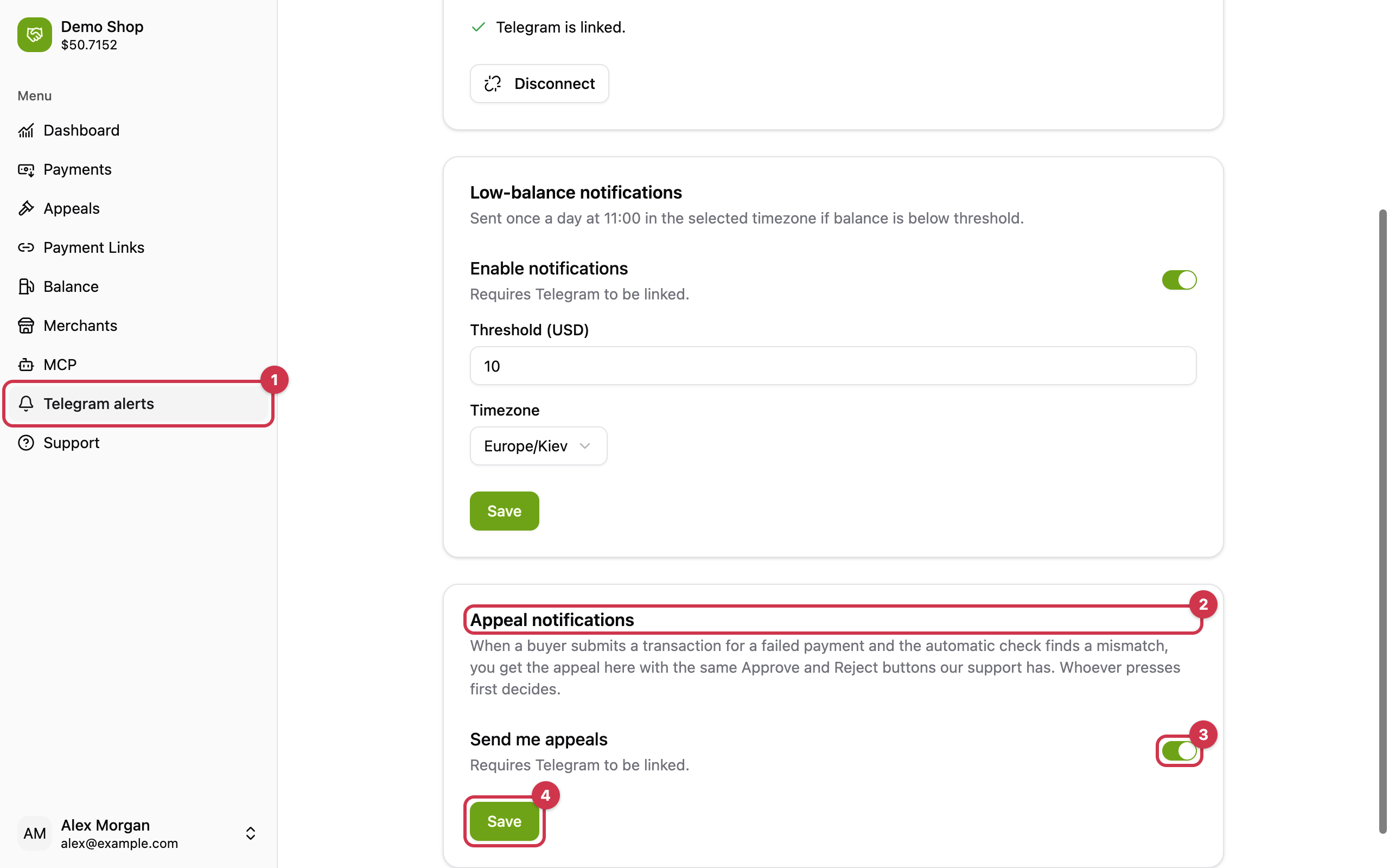
Every user of your account who turned it on gets a copy.
What arrives
Only appeals that need a decision: automatic confirmations and refused hashes never reach the chat. The message carries the payment, the order id, the invoice and the expected amount, your wallet address, every check with what was expected and what arrived, and the transaction hash with a link to the explorer. Under it:
| Button | Effect |
|---|---|
| ✅ Approve | The payment becomes confirmed_manual with the transfer as it arrived, your webhook fires, and the fee of the full invoice is charged to your balance. |
| ❌ Wrong amount, ❌ Too late, ❌ Not this payment | The appeal is rejected, the buyer sees the reason on the failed screen, the payment stays failed. |
A transfer in a coin Cryptunnel does not know has no Approve button - it can only be rejected.
The first press wins. After a decision every copy - yours, your colleagues' and support's - is rebuilt with the decision, who made it and when, and the buttons disappear.
The same appeals are in the cabinet - see Review appeals in the cabinet - and in the API, see Manual confirmation by hash.
Updated 6 days ago